Service Schedules
Formbird FLEET includes a flexible system for setting up preventive maintenance schedules, from simple single-service intervals to complex multi-stage schedules with inherited checks. When an asset reaches a service threshold, the system automatically generates a Service Request for the workshop.
All preventive maintenance scheduling is managed from the PM Service Schedules page. To reach it, open the Configuration dropdown from the Administrator homepage and select PM Service Schedules.
How It Works
Setting up a service schedule involves creating a set of reusable building blocks, then combining them into a schedule for each asset. Once the configuration is in place and the services are generated, the system handles request generation automatically.
The process follows these steps in order:
- Create Service Check Questions, Service Materials, and Questionnaires as needed
- Create Service Definitions, the individual services, including what work is involved and when each service is due
- Create a Service Configuration, the full schedule for a single asset
- Generate Service Details Documents from the configuration
- When the asset reaches a service threshold, the system automatically generates a Service Request
- The workshop actions the Service Request
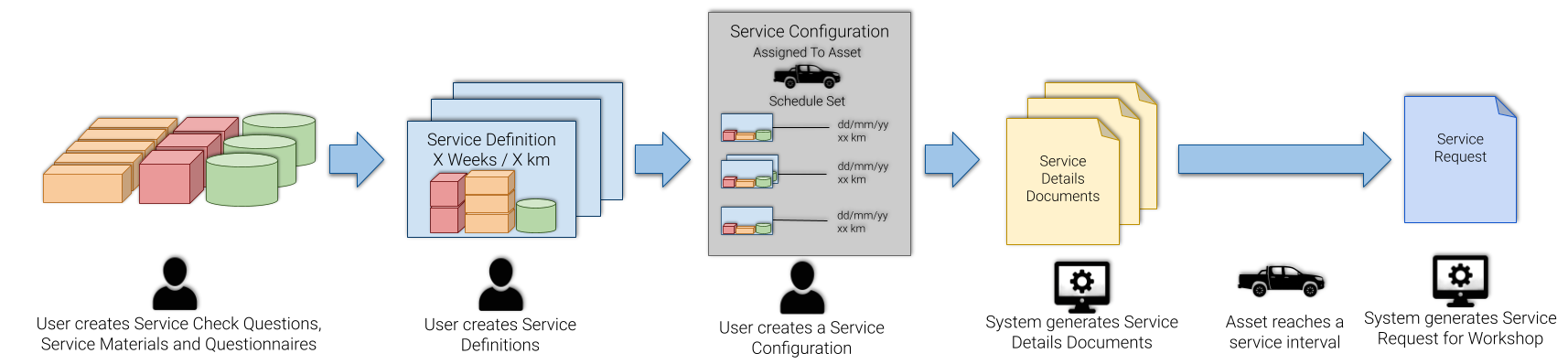
For step-by-step instructions, see Creating Service Schedules.
Building Blocks
Service Check Questions
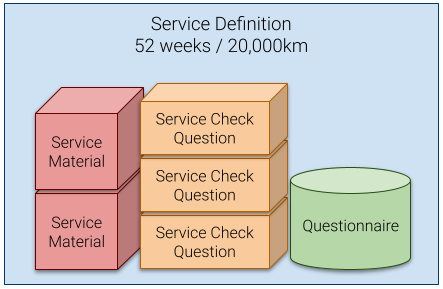
Service Check Questions are the individual tasks a Technician completes during a service, written as explicit instructions such as Inspect X, Replace X, or Adjust X. They are organised by category and appear as a checklist on the PM Service Work Order.
Check questions are reusable. The same question can appear across multiple Service Definitions. Editing a check question affects every definition that uses it. A set of basic check questions can be added to your environment on request. Contact Formbird Support.
Service Materials
Service Materials are the expected consumables for a service, for example, oil filters or engine oil. They appear on the PM Service Work Order so Technicians can record what was actually used, enabling expected vs actual cost analysis per service.
Like check questions, Service Materials are reusable and shared across definitions. Learn more about Materials.
Questionnaires
Questionnaires capture additional structured information during a service and appear alongside the checklist on the PM Service Work Order, for example, tyre inspections, oil sampling, or defect recording.
Questionnaires are configured separately and associated with Service Definitions. Learn more about Questionnaires and Defect Monitoring.
Service Definitions
A Service Definition describes what a service involves and when it should occur. It combines check questions, materials, and questionnaires into a single service, with one or more intervals that determine when it triggers (by time, distance, engine hours, or fuel consumption).
Note: The intervals configured on a Service Definition determine which readings are required when a Technician completes the PM Service Work Order. When the work order status is set to Complete, the application checks the linked Service Details Document and mandates a reading for each interval type that is active: a Date at Service for a time-based interval, a Primary Meter reading for a distance or hours interval, a Secondary Meter reading if a secondary meter interval is set, and a Fuel Reading if a fuel consumption interval is set. The work order cannot be saved as Complete until all required readings are filled in. These readings give the system an exact record of where the asset was in its lifecycle at the time of service, which it uses to schedule the next service at the correct interval.
Service Definitions are reusable. The same definition can appear in the schedules of multiple assets. Changes to a definition flow through to all configurations and Service Details Documents that use it.
Service Configurations
A Service Configuration arranges one or more Service Definitions into a complete schedule for a single asset. There are two configuration types, Periodic and Sequential, described below.
Service Details Documents
Service Details Documents are generated from a configuration and represent each individual scheduled service across the asset's lifetime. They are what the system checks nightly to determine whether a Service Request should be generated.
Configuration Types
Periodic
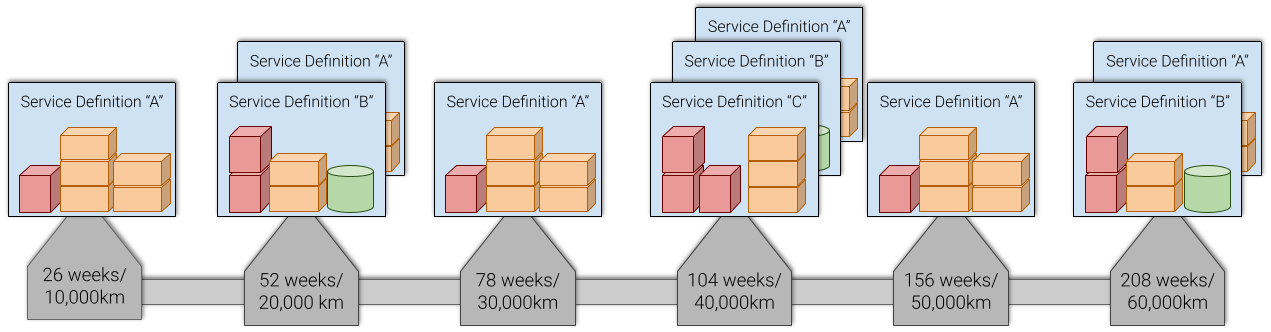
A Periodic configuration is best suited to assets where major services inherit the tasks of minor services. For example:
- Service A occurs every 10,000 km / 26 weeks
- Service B occurs every 20,000 km / 52 weeks, and inherits everything from A
- Service C occurs every 40,000 km / 104 weeks, and inherits everything from A and B
This produces a repeating schedule in the order A – B – A – C, where the B service includes all of A's checks, and the C service includes all of A and B's checks.
Sequential
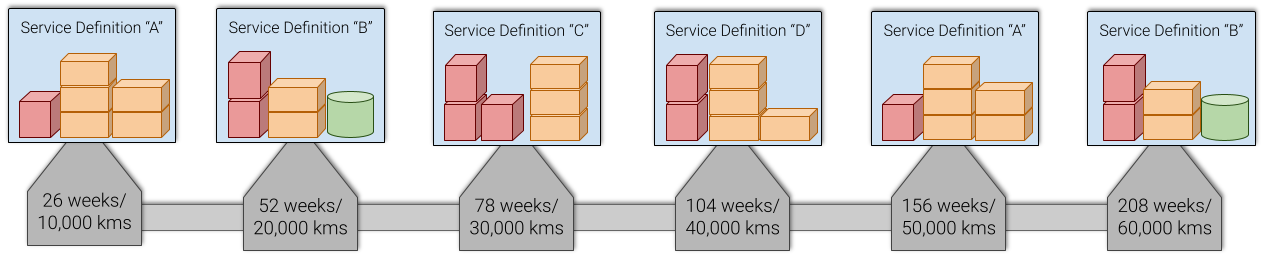
A Sequential configuration is best suited to assets where each service is largely distinct. There is little or no overlap between services, or services occur at specifically defined points before repeating. For example:
- Service A at 10,000 km / 26 weeks
- Service B at 20,000 km / 52 weeks
- Service C at 30,000 km / 78 weeks
- Service D at 40,000 km / 104 weeks
This produces a repeating sequence: A – B – C – D – A – B – C – D…
Service Request Generation
Once Service Details Documents are in place, the system generates Service Requests automatically when an asset reaches a service threshold. Requests can also be generated manually using the Asset Services Due report.
See Service Requests for full details on how generation works and how to use the Asset Services Due report.
Published: May 2026 · Formbird FLEET 4.2.8